The Use of a CRM in the Lead Generation Business
CRM for Lead Generation
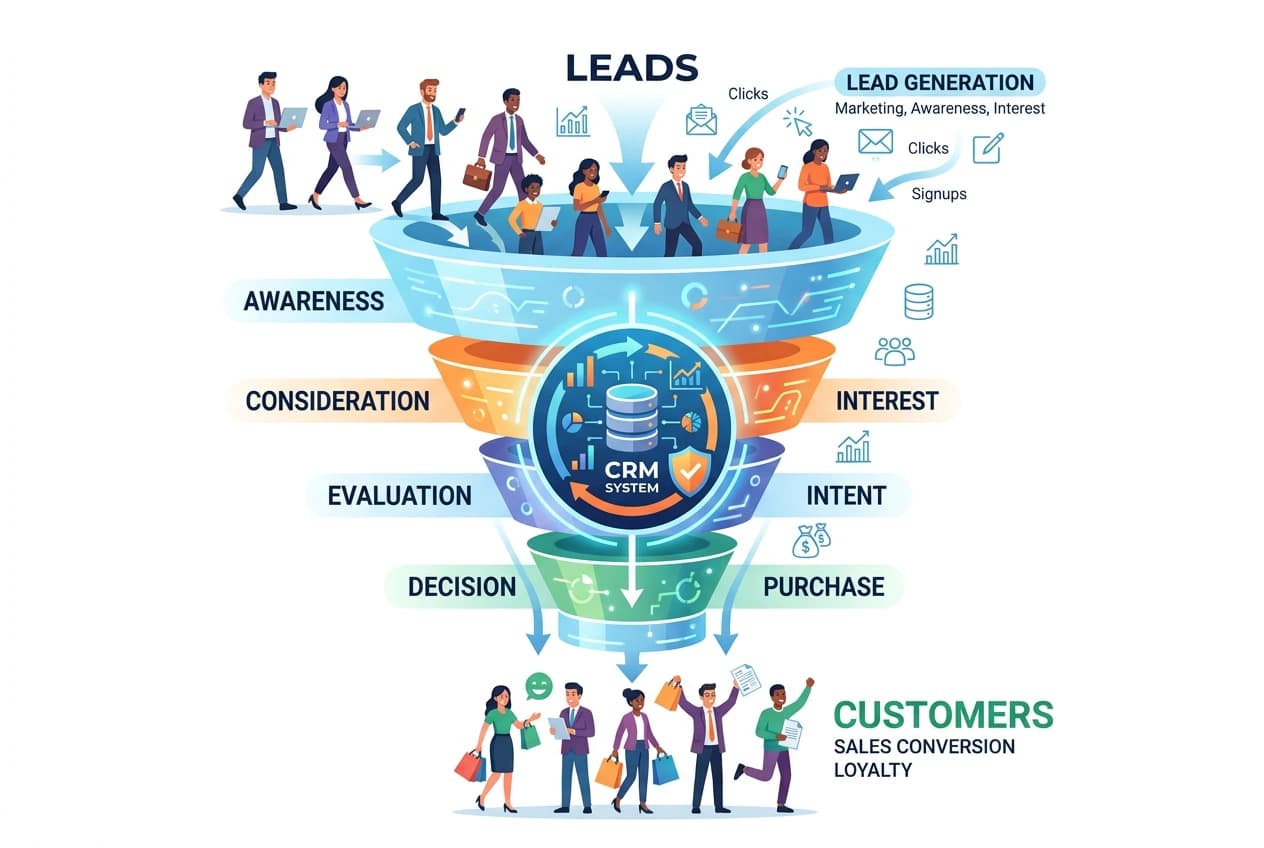
A CRM is the system you use to capture leads, respond fast, stay organized, and automate follow-up - it solves 2 problems. The first - it keeps track of everything happening in between you and prospects. Second, it automates workflows used to nurture prospects into customers and then manage those customers.
1) Automated email + text notifications
CRMS are superb to automate email / communication sequences that help your prospects move through the sales funnel / pipeline.
- Instant auto-responses when a lead comes in using AI chatbots integrations
- Can automate any kind and type of ‘heads up’ message to both the lead and / or your customer
- Even assists with answering questions that potential leads may have
- Keeps the communication going when your agency is offline
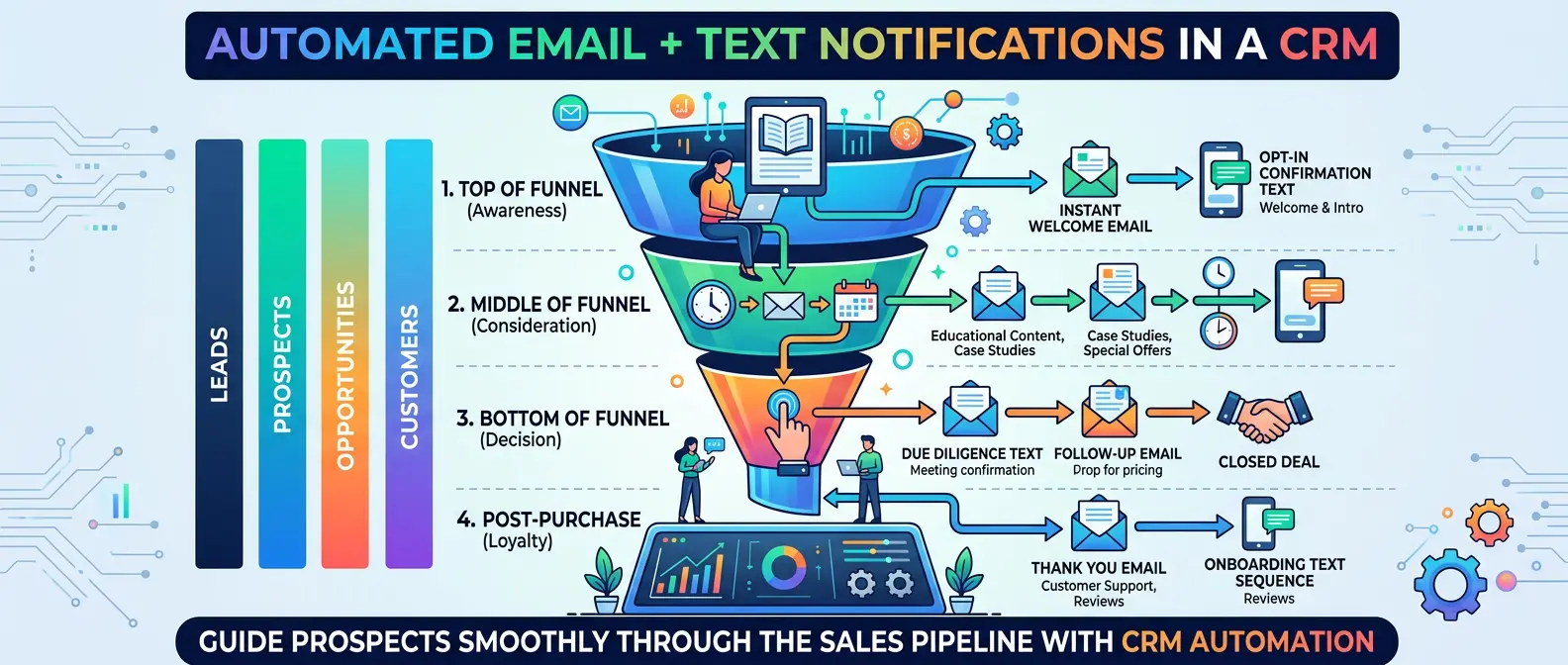
CRMs automate lead nurturing and communication, ensuring no prospect is left behind.
2) Calling (including international) using VOIP integration
VOIP are just superior compared to traditional telecom services when running a business. They integrate to your CRM, can be easily recorded, and can dial internationally if needed.
- Click to call anyone / anywhere directly to their phone
- Track call attempts and outcomes
- Record calls (so long it’s business related and ethical) and keep notes tied to the contact
- One place to see “did we call/text/email or not?”
- Works very well for sales teams calling to close new business
3) Website + lead capture
CRMs are superb tools for busy founders who need to build a landing page or website fast and connect a lead capture form which stores data on the CRM.
- Websites / Landing pages / forms / chat widgets <- you can make them all on a CRM
- Route form submissions directly into the CRM
- Tag leads by service, location, campaign, or source automatically
4) Calendar + booking links
Paid CRM plans often come with calendar / appointment setting abilities. Your customers can book meeting slots with your sales teams right on the lead capture form, or you can send out calendar links to prospects in your emails.
- Connect your calendar so more lead buyers can book meetings with you
- Auto-confirmations + reminders (SMS/email)
- No-show reduction workflows (reminders + reschedule links)
5) Handling conversations in one inbox
CRMs have powerful contact and communication interfaces that support calls, emails, and text messages. These interfaces let you switch between conversation screens you’re having with multiple customers at once while keeping track of every interaction you’ve had. Including recording calls.
- Central inbox for SMS, email, WhatsApp (depends on CRM), web chat
- Full conversation history per lead/customer
- Assign conversations to team members
6) Pipelines (lead stages)
Pipelines or funnels are how every customer moves through your business. Most come in as leads and move through pipelines till they become paying customers and then repeat paying customers. CRMs make this whole process highly visual by categorizing and displaying what stage of the pipeline your prospect is in.
- Visual stages like: New Lead → Contacted → Qualified → Booked → Won/Lost
- Clear next action per lead
- Helps you see bottlenecks instantly (ex: stuck in “Contacted”)
7) Automated workflows (ties back to 1)
Circling back to automation, a CRM is essential to automating your agency. An old saying stays true - agencies never sleep - and CRMs are what lets you run a scaling lead generation and selling agency in 2026 and beyond.
- If lead submits form → send SMS instantly → wait 2 min → call task → follow-up sequence
- If appointment booked → confirmation + reminders
- If no response → different cadence
- If customer paid → move stage + internal notifications
Bottom line
A CRM is for notifications, calling, booking, conversations, pipelines, and workflows - it’s the system that runs your follow-up so leads don’t leak.
Read Next: Complete Guide on How to Start a Lead Generation Agency and Sell Leads Globally
Automate your lead distribution and scale without manual work.
LeadSwitchboard makes it all work together. One platform for everything.